Buy mentorcoaching.eu ?
We are moving the project
mentorcoaching.eu .
Are you interested in purchasing the domain
mentorcoaching.eu ?
domain@kv-gmbh.de · 0541-91531010
Buy mentorcoaching.eu ?
Has a photo been added for white laundry?
No, a photo has not been added for white laundry. **
Should the application photo be in black and white?
It is generally recommended to use a color photo for job applications as it provides a more accurate representation of your appearance. A color photo allows the employer to see your skin tone, hair color, and overall presentation more clearly. Using a black and white photo may not showcase these details effectively and could potentially hinder your chances of making a strong first impression. **


Similar search terms for Duraline-Wallscapes-White-Photo
Top-Angebote
Products related to Duraline-Wallscapes-White-Photo:
-
Amore Wallscapes Family Wall Sign Decorative Wall DécorAdd a meaningful touch to your space with this Family wall sign, designed to celebrate the people who matter most. The warm espresso finish and clean lettering create a welcoming look that fits easily into a variety of interiors.29,49 $*Shipping: 0,00 $Secure redirect to the provider
-
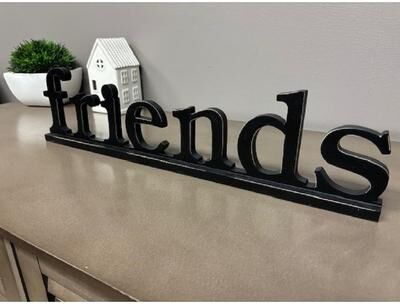
Amore Wallscapes Friends Wall Sign Decorative Wall DécorCelebrate connection and friendship with this Friends wall sign, designed to add a warm and inviting touch to your space. The rich espresso finish and clean lettering create a versatile look that complements a variety of interiors.21,79 $*Shipping: 0,00 $Secure redirect to the provider
-
Engaged' Decorative White Photo FrameCelebrate your proposal moment with the 'Engaged' Decorative White Photo Frame. Designed with a clean, smooth white finish, this elegant rectangular picture frame features a central window sized for a standard 6" x 4" (15x10cm) landscape photograph. Beneath the photo aperture, the word "Engaged" is printed in stylish, flowing black script lettering to highlight your joyful news. Complete with a standing easel back for effortless display, this modern frame brings romantic charm to bedside tables, mantels, or desks. It makes a perfect keepsake gift for newly engaged couples to treasure their special announcement forever. Dimensions: H15 x W20cm5,00 £*Shipping: 4,99 £Secure redirect to the provider



-
How can you make the background of a photo white?
To make the background of a photo white, you can use a photo editing software like Adobe Photoshop or GIMP. First, use the selection tool to outline the subject of the photo. Then, invert the selection to include the background. Next, adjust the levels or curves to increase the brightness and whiteness of the background. You can also use the brush tool to manually paint over any remaining non-white areas. Finally, save the edited photo with the white background. **
-
How should the application photo for a training program look like if you are wearing a white undershirt under a white shirt?
When wearing a white undershirt under a white shirt for a training program application photo, it's important to ensure that the undershirt is not visible through the outer shirt. The photo should present a clean and professional appearance, so make sure the undershirt is not wrinkled or bunched up under the shirt. Additionally, the overall look should be well-groomed and presentable, with attention to good posture and a confident expression. It's important to convey a polished and professional image in the application photo. **
-
How does photo development work at dm?
At dm, photo development works by customers bringing in their film rolls or digital files to be printed. The staff then processes the film or digital files using professional equipment to produce high-quality prints. Customers can also choose from a variety of printing options, such as different sizes and finishes. Once the prints are ready, customers can pick them up at the store or have them delivered to their home. **
-
What causes the white streaks on the HP Envy Photo 6230?
The white streaks on the HP Envy Photo 6230 are typically caused by clogged or dirty printheads. When the printheads become blocked or contaminated with dried ink, it can result in uneven or streaky printing. Regular maintenance, such as cleaning the printheads or running the printer's cleaning cycle, can help prevent and resolve this issue. Additionally, using high-quality ink cartridges and paper can also contribute to better print quality and reduce the likelihood of white streaks. **


How can I restore a white face in a photo to its natural skin color using photo editing?
To restore a white face in a photo to its natural skin color using photo editing, you can start by adjusting the white balance to correct any color cast. Next, you can use the color correction tools to adjust the hue, saturation, and luminance of the skin tones to match the natural color. Additionally, you can use the healing brush or clone stamp tool to remove any overexposed areas or blemishes on the skin. Finally, you can fine-tune the overall color balance and contrast to ensure the skin looks natural and realistic. **
How can one edit the background of a photo to be white?
To edit the background of a photo to be white, you can use photo editing software like Adobe Photoshop or GIMP. One way to do this is by using the selection tool to outline the subject of the photo and then delete the background. You can also use the eraser tool to manually remove the background and fill in the empty space with white. Another option is to use the background eraser tool to automatically remove the background and replace it with white. **
Top-Angebote
Products related to Duraline-Wallscapes-White-Photo:
-
Duraline Wallscapes White Photo Ledge Wall Shelf Display LedgeCreate a clean, organized display with this extra-long white photo ledge wall shelf. The 46.5-inch width provides generous space for arranging framed photos, décor, or small essentials, while the ledge design helps keep items securely in place.36,47 $*Shipping: 0,00 $Secure redirect to the provider
-
Duraline Wallscapes Black Photo Ledge Wall ShelfCreate a clean, organized display with this black photo ledge wall shelf. The streamlined design offers ample space for arranging framed photos, décor, or small essentials, while the ledge helps keep items securely in place.35,88 $*Shipping: 0,00 $Secure redirect to the provider
-
Amore Wallscapes Family Wall Sign Decorative Wall DécorAdd a meaningful touch to your space with this Family wall sign, designed to celebrate the people who matter most. The warm espresso finish and clean lettering create a welcoming look that fits easily into a variety of interiors.29,49 $*Shipping: 0,00 $Secure redirect to the provider
-
Has a photo been added for white laundry?
No, a photo has not been added for white laundry. **
-
Should the application photo be in black and white?
It is generally recommended to use a color photo for job applications as it provides a more accurate representation of your appearance. A color photo allows the employer to see your skin tone, hair color, and overall presentation more clearly. Using a black and white photo may not showcase these details effectively and could potentially hinder your chances of making a strong first impression. **
-
How can you make the background of a photo white?
To make the background of a photo white, you can use a photo editing software like Adobe Photoshop or GIMP. First, use the selection tool to outline the subject of the photo. Then, invert the selection to include the background. Next, adjust the levels or curves to increase the brightness and whiteness of the background. You can also use the brush tool to manually paint over any remaining non-white areas. Finally, save the edited photo with the white background. **
-
How should the application photo for a training program look like if you are wearing a white undershirt under a white shirt?
When wearing a white undershirt under a white shirt for a training program application photo, it's important to ensure that the undershirt is not visible through the outer shirt. The photo should present a clean and professional appearance, so make sure the undershirt is not wrinkled or bunched up under the shirt. Additionally, the overall look should be well-groomed and presentable, with attention to good posture and a confident expression. It's important to convey a polished and professional image in the application photo. **
Similar search terms for Duraline-Wallscapes-White-Photo
-
Amore Wallscapes Friends Wall Sign Decorative Wall DécorCelebrate connection and friendship with this Friends wall sign, designed to add a warm and inviting touch to your space. The rich espresso finish and clean lettering create a versatile look that complements a variety of interiors.21,79 $*Shipping: 0,00 $Secure redirect to the provider
-
Engaged' Decorative White Photo FrameCelebrate your proposal moment with the 'Engaged' Decorative White Photo Frame. Designed with a clean, smooth white finish, this elegant rectangular picture frame features a central window sized for a standard 6" x 4" (15x10cm) landscape photograph. Beneath the photo aperture, the word "Engaged" is printed in stylish, flowing black script lettering to highlight your joyful news. Complete with a standing easel back for effortless display, this modern frame brings romantic charm to bedside tables, mantels, or desks. It makes a perfect keepsake gift for newly engaged couples to treasure their special announcement forever. Dimensions: H15 x W20cm5,00 £*Shipping: 4,99 £Secure redirect to the provider
-
Wallscapes Capri Clear Glass Wall Shelf with Pelican BracketsBring a light, decorative touch to your walls with the Capri clear glass wall shelf. The transparent surface keeps the look open and uncluttered, while the pelican-style brackets in an antique white finish add a softer, classic detail.33,87 $*Shipping: 0,00 $Secure redirect to the provider
-
Wallscapes Capri Clear Glass Wall Shelf with Crowne BracketsCreate a clean, elevated display with the Capri clear glass wall shelf. The transparent surface keeps your space feeling open and uncluttered, while the crowne-style brackets add a refined, decorative touch.49,49 $*Shipping: 0,00 $Secure redirect to the provider
-
How does photo development work at dm?
At dm, photo development works by customers bringing in their film rolls or digital files to be printed. The staff then processes the film or digital files using professional equipment to produce high-quality prints. Customers can also choose from a variety of printing options, such as different sizes and finishes. Once the prints are ready, customers can pick them up at the store or have them delivered to their home. **
-
What causes the white streaks on the HP Envy Photo 6230?
The white streaks on the HP Envy Photo 6230 are typically caused by clogged or dirty printheads. When the printheads become blocked or contaminated with dried ink, it can result in uneven or streaky printing. Regular maintenance, such as cleaning the printheads or running the printer's cleaning cycle, can help prevent and resolve this issue. Additionally, using high-quality ink cartridges and paper can also contribute to better print quality and reduce the likelihood of white streaks. **
-
How can I restore a white face in a photo to its natural skin color using photo editing?
To restore a white face in a photo to its natural skin color using photo editing, you can start by adjusting the white balance to correct any color cast. Next, you can use the color correction tools to adjust the hue, saturation, and luminance of the skin tones to match the natural color. Additionally, you can use the healing brush or clone stamp tool to remove any overexposed areas or blemishes on the skin. Finally, you can fine-tune the overall color balance and contrast to ensure the skin looks natural and realistic. **
-
How can one edit the background of a photo to be white?
To edit the background of a photo to be white, you can use photo editing software like Adobe Photoshop or GIMP. One way to do this is by using the selection tool to outline the subject of the photo and then delete the background. You can also use the eraser tool to manually remove the background and fill in the empty space with white. Another option is to use the background eraser tool to automatically remove the background and replace it with white. **
* All prices are inclusive of VAT and, if applicable, plus shipping costs. The offer information is based on the details provided by the respective shop and is updated through automated processes. Real-time updates do not occur, so deviations can occur in individual cases. ** Note: Parts of this content were created by AI.